MD338 Hybrid watch face
Matteo Dini MD ® Watch FacesPersonalization
4.644.00 Reviews
- Version
- Varies With Device
- Installs
- 10.00K
- Age Rating
- Everyone
Screenshots
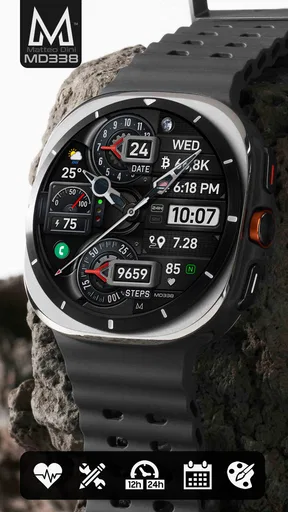
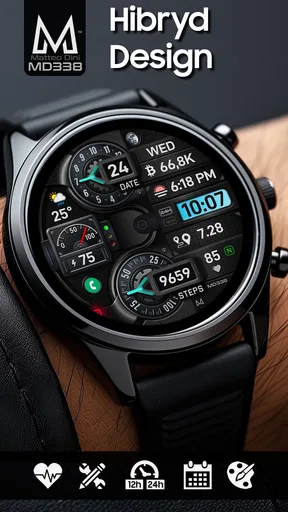
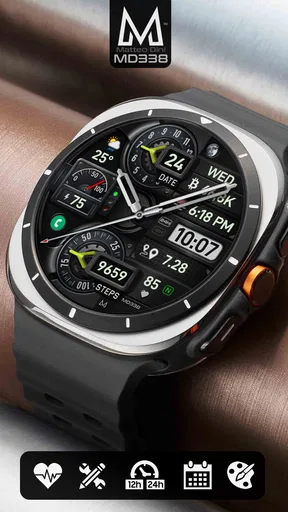
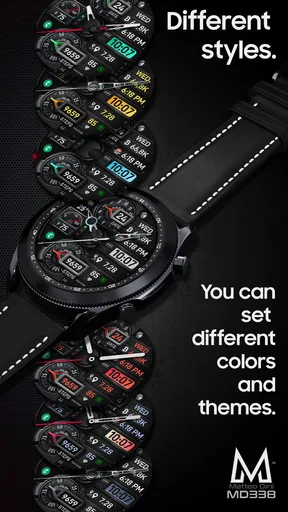
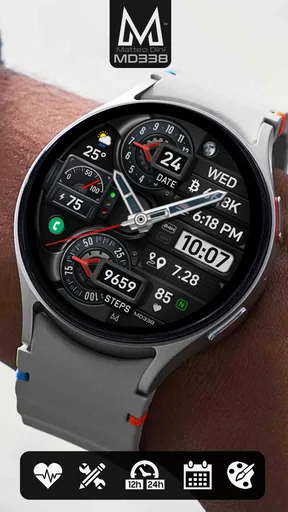
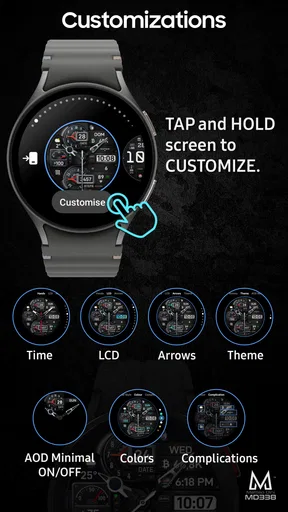
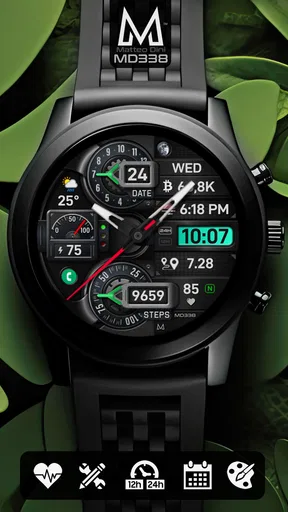
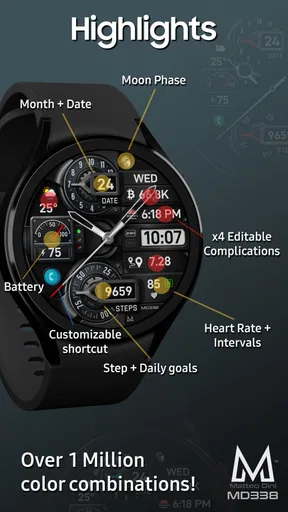
Our Review of MD338 Hybrid watch face
 Analysis by Appyee
I usually judge a watch face by asking one practical question first: does it make checking the time easier without making the watch feel cluttered? After spending time with MD338 Hybrid, I found that its appeal comes from balance. It combines an analog-style clock with digital information, while leaving enough room for personal adjustment. That makes it more interesting than a fixed decorative face, but it also means the best result depends on how carefully you configure it.
This is a paid personalization app for Wear OS, created by Matteo Dini MD ® Watch Faces. It costs $1.99, is rated for Everyone, and was released on Jul 21, 2024. Its current average is 4.6 from around 500 ratings, with more than 10K installs. Those figures suggest a modest but established audience rather than a mass-market utility, which fits the product: it is aimed at people who care about the appearance and information layout of their smartwatch.
How I would decide whether this watch face fits
The first decision is visual. If you want your watch to resemble a traditional timepiece while still showing useful digital details, this design is a sensible starting point. If you prefer an extremely clean screen with only the hands and no secondary information, a simpler analog face will probably feel more natural. On the other hand, if you want a dense dashboard that resembles a miniature phone display, a fully digital face may suit you better.
I would also consider how often you change watch faces. Someone who chooses one appearance and keeps it for months can benefit from the customization work. Someone who swaps faces every morning may find the setup process less rewarding, especially if the attraction is mainly novelty. The hybrid format is most convincing when you want one dependable everyday face rather than a collection of themed designs.
There is another important question: what do you actually read at a glance? I tend to look at the time first, then the date or activity information, and only occasionally the rest. A customizable face is useful because it lets you give visual priority to the information you use most. It is less useful if you keep adding elements simply because space is available. The difference between a helpful layout and a busy one is often a few small choices.
The analog-digital balance works best when it stays intentional
The hands provide the familiar reading experience, while the digital portions make exact time checking quicker. In bright conditions, I appreciate being able to glance at the display instead of interpreting the hand positions. In quieter situations, the analog presentation feels less like a notification panel and more like a watch.
That combination is the central strength of MD338 Hybrid, but it is also the main trade-off. A hybrid face has to satisfy two visual systems at once. Too much information can compete with the hands; too little can make the digital portion feel unnecessary. I recommend beginning with the default arrangement, wearing it through a normal day, and changing only the items that genuinely slow you down or go unnoticed.
A useful setup trick is to separate information by how often you need it. Put frequently checked details in the most visible areas and leave occasional information in less prominent positions. For example, a person who checks the date during work might value a clear date placement more than extra activity details. Someone who uses the watch mainly during exercise may make a different choice. The face becomes more effective when it reflects a routine instead of trying to represent every possible need.
Customization is valuable, but restraint matters
The main reason to choose this app over a static watch face is control. You can shape the appearance around your wrist, clothing, and habits rather than accepting a single composition. That is particularly helpful if you dislike faces that look attractive in a screenshot but become hard to read once worn in real life.
I would approach customization in stages. First, choose a color and contrast level that remains legible indoors and outdoors. Next, decide which information deserves permanent space. Only after that would I experiment with decorative adjustments. This order prevents a common problem with customizable faces: spending time making the display look distinctive, then discovering that the important details are visually buried.
There is also a practical reason not to over-customize. A watch face is viewed for seconds, not studied like a phone home screen. If every area has a different visual treatment, the eye needs longer to locate the time. A restrained configuration can make the hybrid design feel considerably more premium than an overloaded one, even though both start from the same app.
Everyday use: a realistic workday example
Imagine wearing the watch during a normal office day. In the morning, you need the time quickly while getting ready. During the commute, a glance at the date may be more useful than a decorative detail. At work, you check the time between meetings without wanting to unlock a phone. Later, you may want a quick look at activity-related information while walking home.
MD338 Hybrid makes sense in that routine because it can serve both a traditional and an informational role. The analog hands keep the face calm during meetings, while the digital elements help with precise checks. The key is to configure it around those repeated moments rather than around every feature you might use once a week.
I would not describe it as a replacement for a dedicated fitness interface or a full notification center. Its job is to remain a watch face first. That distinction matters. If your priority is detailed exercise data, navigation, or reading long alerts, you will probably move beyond the watch face regardless of how well it is arranged. If your priority is a polished daily screen with useful at-a-glance information, the design is more convincing.
Where this watch face wins against the usual alternatives
Compared with a basic analog face, the hybrid layout gives you more information without forcing you into a completely digital appearance. That is the clearest reason to choose it. Basic analog alternatives are often easier to understand immediately, but they can require another tap or a phone check for details you would rather see on the wrist.
Compared with a busy digital dashboard, MD338 Hybrid feels more restrained. A dashboard can be excellent for users who want maximum information, but it may look out of place with formal clothing or become visually tiring during a long day. The analog foundation gives this app a more adaptable character. I can imagine using it with casual clothes, office wear, or a smart-casual outfit without the screen becoming the most noticeable part of the watch.
It also has an advantage over novelty-focused faces. Themed designs can be fun, but their usefulness may decline once the initial excitement fades. This one is easier to treat as a long-term daily choice because its identity comes from the structure rather than a temporary graphic theme. That makes the purchase easier to justify for someone who wants one dependable appearance.
Another subtle win is the ability to tune the face instead of adapting your habits to a fixed layout. If the standard arrangement places information in an inconvenient area, customization gives you a way to make the screen feel more personal. This is not just cosmetic. On a small watch display, moving one frequently used detail closer to where your eyes naturally land can reduce the effort of every glance.
Where another category may fit you better
I would steer you toward a minimal analog alternative if you want the least possible visual distraction. For some people, the watch should show the time and nothing else. In that case, the hybrid information may feel like unnecessary noise, even when it is neatly arranged.
A digital-first alternative may be better if exact numerical time is your only priority, or if you prefer large, high-contrast figures over hands. Digital faces can also be easier to scan during quick movement, depending on the layout and lighting. MD338 Hybrid is not automatically superior; it is better for the person who likes the character of analog design but still wants digital convenience.
A data-heavy alternative may suit users who treat the watch as a constant dashboard. If you want several metrics visible at once and are comfortable with a denser appearance, a face designed specifically around information may be more direct. Choosing the hybrid design in that situation could mean repeatedly opening apps or changing screens, which defeats the purpose of having everything immediately available.
Finally, a free alternative may be the sensible decision if you are still experimenting with Wear OS or change your style frequently. The price is low, but it is still a purchase. I see the value more clearly when the face becomes part of a daily routine. If you are unsure whether you even like hybrid watch faces, trying a free option first can prevent an unnecessary purchase.
Small decisions that improve the experience
One of my strongest recommendations is to judge the face on your wrist, not only in the customization screen. A layout that looks balanced against a plain preview may feel different once the watch is angled, partially covered by a sleeve, or viewed outdoors. Wear it for a full routine before making a final decision about what to keep visible.
I would also create a “reading hierarchy.” The time should be instantly recognizable, the date or most important secondary item should be easy to find, and everything else should remain subordinate. If you cannot identify the time during a quick glance, remove visual competition before adding more customization.
Another useful approach is to make one change at a time. When several elements are adjusted together, it becomes difficult to know which change helped. Changing a color, position, or information choice individually gives you a clearer sense of what improves readability. This matters more on a small screen than it would on a phone, where there is room to recover from a poor layout.
If you use different watch straps or dress differently throughout the week, choose a neutral configuration first. A highly specific color treatment may look excellent with one strap and awkward with another. The hybrid structure already provides personality, so a flexible palette can make the face easier to live with over time.
What the purchase and switching decision really involves
At $1.99, the financial risk is limited, but the real cost is attention. You may spend time adjusting the layout, comparing it with the face you already use, and deciding whether the extra information improves your routine. That is worthwhile if you enjoy personalization. It is less worthwhile if you want an instant, finished appearance with no decisions.
Switching from a simple face is easy conceptually but can change how you interact with the watch. You may start glancing at information that was previously hidden, which can be useful or distracting. I recommend deciding in advance which details deserve your attention. Otherwise, customization can encourage you to check the screen more often instead of merely making each check more efficient.
Switching from a dense digital face may feel calmer, but you could initially miss having every detail presented in large numerical form. Give yourself time to adapt to reading the hands again. The analog component is not just decoration; it changes the rhythm of quick checks. For users accustomed to digital-only displays, that adjustment is part of the experience and should be considered before buying.
The app’s Everyone content rating also makes it broadly approachable from a content perspective. That does not mean every visual arrangement will suit every wearer. Children, older users, or anyone with eyesight concerns should prioritize contrast and immediate readability over decorative flexibility. The customization is most valuable when it improves access to the information you need.
Because the developer is Matteo Dini MD ® Watch Faces, the product sits within a focused watch-face catalog rather than a general-purpose personalization tool. That is helpful if you want a design made specifically for a Wear OS watch. It also means the purchase decision should be based on the face itself, not on expectations that it will behave like a broader watch-management application.
Who should buy it, and who should skip it
I think it is a strong fit for Wear OS owners who want a traditional-looking face with configurable digital information. It is especially suitable for someone replacing a fixed analog design, someone tired of overly busy dashboards, or someone who wants one face that can move between work and casual use.
I would skip it if you want a completely bare analog display, a large digital clock with no visual interpretation, or a specialized data screen for exercise and productivity. I would also hesitate if you rarely change watch settings and dislike spending time refining small details. The app’s value is tied to the relationship between its hybrid layout and your willingness to personalize it.
It is also not the best choice if your main reason for changing faces is collecting striking themes. MD338 Hybrid is more practical than theatrical. Its strength is repeat use, not necessarily creating a dramatic first impression. That can be a virtue, but only if everyday usefulness matters more to you than visual novelty.
My recommendation after using it as a daily face
MD338 Hybrid is worth considering when you want one adaptable Wear OS face rather than a rotating gallery. I like the way it brings together the familiarity of analog hands and the convenience of digital information without forcing the screen into a dashboard style. The customization gives it a better chance of fitting your actual routine, provided you use that flexibility carefully.
My recommendation is to buy it if you can answer yes to three questions: do you like analog watch design, do you want selected information visible at a glance, and are you willing to spend a little time arranging the display? If the answer to all three is yes, the small purchase makes sense. The app has enough flexibility to become personal without losing its everyday character.
If your answers are no, there are clearer alternatives. Choose a minimal analog face for simplicity, a digital-first face for instant numerical reading, or a data-focused face for maximum information. Those options may serve your habits better than trying to force a hybrid design into a role it was not meant to fill.
For me, the deciding factor is not the number of customization choices but the quality of the compromise. This face gives traditional styling a practical reason to exist on a modern smartwatch. Set it up with discipline, keep the most important information easy to find, and it can become a comfortable daily companion rather than another screen that asks for attention.
Verdict
Strengths of MD338 Hybrid watch face
- Clean hybrid layout combines analog hands with easy digital time reading.
- Includes useful complications for date, battery, steps, and weather at a glance.
- Multiple color and display options make personalization straightforward.
- Designed for quick readability during workouts and everyday use.
- Typically uses a restrained style that suits both casual and formal watch bands.
Limitations of MD338 Hybrid watch face
- Some customization options may depend on the Wear OS watch model.
- Weather and other complications may require extra permissions or setup.
- The information-rich layout can feel crowded on smaller watch displays.
- Battery impact may increase when always-on elements and complications are enabled.
- Not compatible with Apple Watch or devices outside the supported Wear OS ecosystem.
Other Releases by Matteo Dini MD ® Watch Faces
View All
MD242 Hybrid watch face
Personalization4.5

MD307 Digital watch face
Personalization4.4

MD326 3D Modern Watch Face
Personalization4.6

MD170B Digital watch face
Personalization4.6
Similar Picks in This Category
View All
Microsoft SwiftKey AI Keyboard
SwiftKey4.3

Wallpapers
Google LLC4.1

Zedge™ Wallpapers & Ringtones
Zedge4.7

Yandex Browser with Alice AI
Direct Cursus Computer Systems Trading LLC4.3

Ringtone Maker:create ringtone
Big Bang Inc.4.7

Fonts Keyboard
Fonts Keyboard3.9
Frequently Asked Questions
What is MD338 Hybrid watch face?
MD338 Hybrid is a Wear OS watch face that combines an analog-style clock with digital information in a compact, modern layout. It is designed for compatible Android smartwatches and typically focuses on quick access to practical details such as the date, battery status, and other customizable indicators. Before downloading, check that your watch uses a supported Wear OS version, since it is not intended for standard phones or unsupported smartwatch platforms.
Which smartwatches are compatible with MD338 Hybrid?
Compatibility depends on the operating system and installation method supported by the developer. MD338 Hybrid is made for Wear OS watches, but availability can vary between models, regions, and Wear OS versions. It is best to confirm compatibility in the Google Play listing before installing, especially if you own a Samsung Galaxy Watch, Google Pixel Watch, Mobvoi TicWatch, or another Wear OS device. Older watches may have limitations.
Can I customize the MD338 Hybrid watch face?
MD338 Hybrid generally offers customization options through the watch face settings, although the exact choices may depend on the installed version and smartwatch model. Users may be able to adjust colors, display elements, complications, or shortcuts for information such as weather, steps, heart rate, or battery. Some features may require opening the companion settings on the watch or through the Wear OS app after installation.
Does MD338 Hybrid watch face drain the battery?
Like any active watch face, MD338 Hybrid uses some battery power because the display remains available and may update complications or other information throughout the day. Its real-world impact depends on your watch, screen technology, brightness, always-on display settings, and selected complications. To reduce consumption, avoid unnecessary live data, lower brightness, and disable always-on display if you prefer longer battery life.
Is MD338 Hybrid watch face free to download?
The price and included features can vary depending on the store listing, promotions, and the version offered by the developer. Some installations may be free while optional premium functions, customization tools, or companion features could require payment. Review the current Google Play description, permissions, screenshots, and in-app purchase information before downloading so you understand exactly what is included for your specific Wear OS watch.
